Monday, September 11, 2017

V8 Release 6.2

Every six weeks, we create a new branch of V8 as part of our release process. Each version is branched from V8’s git master immediately before a Chrome Beta milestone. Today we’re pleased to announce our newest branch, V8 version 6.2, which is in beta until its release in coordination with Chrome 62 Stable in several weeks. V8 v6.2 is filled with all sorts of developer-facing goodies. This post provides a preview of some of the highlights in anticipation of the release.

Performance improvements


The performance of Object#toString() was previously already identified as a potential bottleneck, since it’s often used by popular libraries like lodash and underscore.js, and frameworks like AngularJS. Various helper functions like _.isPlainObject, _.isDate, angular.isArrayBuffer or angular.isRegExp are often used throughout application and library code to perform runtime type checks.

With the advent of ES2015, Object#toString() became monkey-patchable via the new Symbol.toStringTag symbol, which also made Object#toString() more heavy-weight and more challenging to speed up. In this release we ported an optimization initially implemented in the SpiderMonkey JavaScript engine to V8, speeding up throughput of Object#toString() by a factor of 6.5×.


It also impacts the Speedometer browser benchmark, specifically the AngularJS subtest, where we measured a solid 3% improvement. Read the detailed blog post for additional information.


We’ve also significantly improved the performance of ES2015 proxies, speeding up calling a proxy object via someProxy(params) or new SomeOtherProxy(params) by up to :


And similarly, the performance of accessing a property on a proxy object via someProxy.property improved by almost 6.5×:


This is part of an ongoing internship. Stay tuned for a more detailed blog post and final results.

We’re also excited to announce that thanks to contributions from Peter Wong, the performance of the String#includes() built-in improved by more than since the previous release.

Hashcode lookups for internal hash tables got much faster, resulting in improved performance for Map, Set, WeakMap, and WeakSet. An upcoming blog post will explain this optimization in detail.



The garbage collector now uses a Parallel Scavenger for collecting the so-called young generation of the heap.

Enhanced low-memory mode


Over the last few releases V8’s low-memory mode was enhanced (e.g. by setting initial semi-space size to 512K). Low-memory devices now hit fewer out-of-memory situations. This low-memory behavior might have a negative impact on runtime performance though.

More regular expressions features


Support for the dotAll mode for regular expressions, enabled through the s flag, is now enabled by default. In dotAll mode, the . atom in regular expressions matches any character, including line terminators.

/foo.bar/su.test('foo\nbar'); // true

Lookbehind assertions, another new regular expression feature, are now available by default. The name already describes its meaning pretty well. Lookbehind assertions offer a way to restrict a pattern to only match if preceded by the pattern in the lookbehind group. It comes in both matching and non-matching flavors:

/(?<=\$)\d+/.exec('$1 is worth about ¥123'); // ['1']
/(?<!\$)\d+/.exec('$1 is worth about ¥123'); // ['123']


More details about these features are available in our blog post titled Upcoming regular expression features.

Template literal revision


The restriction on escape sequences in template literals has been loosened per the relevant proposal. This enables new use cases for template tags, such as writing a LaTeX processor.

const latex = (strings) => {
  // …
};

const document = latex`
\newcommand{\fun}{\textbf{Fun!}}
\newcommand{\unicode}{\textbf{Unicode!}}
\newcommand{\xerxes}{\textbf{King!}}
Breve over the h goes \u{h}ere // Illegal token!
`;

Increased max string length


The maximum string length on 64-bit platforms increased from 2**28 - 16 to 2**30 - 25 characters.

FullCodeGen is gone


In 6.2 the final major pieces of the old pipeline are gone. More than 30k lines of code were deleted in this release — a clear win for reducing code complexity.

V8 API


Please check out our summary of API changes. This document is regularly updated a few weeks after each major release.

Developers with an active V8 checkout can use git checkout -b 6.2 -t branch-heads/6.2 to experiment with the new features in V8 6.2. Alternatively you can subscribe to Chrome’s Beta channel and try the new features out yourself soon.

Posted by the V8 team

Wednesday, August 30, 2017

Fast Properties in V8

In this blog post we would like to explain how V8 handles JavaScript properties internally. From a JavaScript point of view there are only a few distinctions necessary for properties. JavaScript objects mostly behave like dictionaries, with string keys and arbitrary objects as values. The specification does however treat integer-indexed properties and other properties differently during iteration. Other than that, the different properties behave mostly the same, independent of whether they are integer indexed or not.

However, under the hood V8 does rely on several different representations of properties for performance and memory reasons. In this blog post we are going to explain how V8 can provide fast property access while handling dynamically-added properties. Understanding how properties work is essential for explaining how optimizations such as inline caches work in V8.

This post explains the difference in handling integer-indexed and named properties. After that we show how V8 maintains HiddenClasses when adding named properties in order to provide a fast way to identify the shape of an object. We'll then continue giving insights into how named properties are optimized for fast accesses or fast modification depending on the usage. In the final section we provide details on how V8 handles integer-indexed properties or array indices.

Named Properties vs. Elements

Let's start by analysing a very simple object such as {a: "foo", b: "bar"}. This object has two named properties, "a" and "b". It does not have any integer indices for property names. array-indexed properties, more commonly known as elements, are most prominent on arrays. For instance the array ["foo", "bar"] has two array-indexed properties: 0, with the value "foo", and 1, with the value "bar". This is the first major distinction on how V8 handles properties in general.

The following diagram shows what a basic JavaScript object looks like in memory.


Elements and properties are stored in two separate data structures which makes adding and accessing properties or elements more efficient for different usage patterns.

Elements are mainly used for the various Array.prototype methods such as pop or slice. Given that these functions access properties in consecutive ranges, V8 also represents them as simple arrays internally — most of the time. Later in this post we will explain how we sometimes switch to a sparse dictionary-based representation to save memory.

Named properties are stored in a similar way in a separate array. However, unlike elements, we cannot simply use the key to deduce their position within the properties array; we need some additional metadata. In V8 every JavaScript object has a HiddenClass associated. The HiddenClass stores information about the shape of an object, and among other things, a mapping from property names to indices into the properties. To complicate things we sometimes use a dictionary for the properties instead of a simple array. We will explain this in more detail in a dedicated section.

Takeaway from this section:
  • Array-indexed properties are stored in a separate elements store.
  • Named properties are stored in the properties store.
  • Elements and properties can either be arrays or dictionaries.
  • Each JavaScript object has a HiddenClass associated that keeps information about the object shape.

HiddenClasses and DescriptorArrays

After explaining the general distinction of elements and named properties we need to have a look at how HiddenClasses work in V8. This HiddenClass stores meta information about an object, including the number of properties on the object and a reference to the object’s prototype. HiddenClasses are conceptually similar to classes in typical object-oriented programming languages. However, in a prototype-based language such as JavaScript it is generally not possible to know classes upfront. Hence, in this case V8, HiddenClasses are created on the fly and updated dynamically as objects change. HiddenClasses serve as an identifier for the shape of an object and as such a very important ingredient for V8's optimizing compiler and inline caches. The optimizing compiler for instance can directly inline property accesses if it can ensure a compatible objects structure through the HiddenClass.

Let's have a look at the important parts of a HiddenClass.


In V8 the first field of a JavaScript object points to a HiddenClass. (In fact, this is the case for any object that is on the V8 heap and managed by the garbage collector.) In terms of properties, the most important information is the third bit field, which stores the number of properties, and a pointer to the descriptor array. The descriptor array contains information about named properties like the name itself and the position where the value is stored. Note that we do not keep track of integer indexed properties here, hence there is no entry in the descriptor array.

The basic assumption about HiddenClasses is that objects with the same structure — e.g. the same named properties in the same order — share the same HiddenClass. To achieve that we use a different HiddenClass when a property gets added to an object. In the following example we start from an empty object and add three named properties.


Every time a new property is added, the object's HiddenClass is changed. In the background V8 creates a transition tree that links the HiddenClasses together. V8 knows which HiddenClass to take when you add, for instance, the property "a" to an empty object. This transition tree makes sure you end up with the same final HiddenClass if you add the same properties in the same order. The following example shows that we would follow the same transition tree even if we add simple indexed properties in between.


However, if we create a new object that gets a different property added, in this case property "d," V8 creates a separate branch for the new HiddenClasses.


Takeway from this section:
  • Objects with the same structure (same properties in the same order) have the same HiddenClass
  • By default every new named property added causes a new HiddenClass to be created.
  • Adding array-indexed properties does not create new HiddenClasses.

The Three Different Kinds of Named Properties

After giving an overview on how V8 uses HiddenClasses to track the shape of objects let’s dive into how these properties are actually stored. As explained in the introduction above, there are two fundamental kind of properties: named and indexed. The following section covers named properties.

A simple object such as {a: 1, b: 2} can have various internal representations in V8. While JavaScript objects behave more or less like simple dictionaries from the outside, V8 tries to avoid dictionaries because they hamper certain optimizations such as inline caches which we will explain in a separate post. 

In-object vs. Normal Properties: V8 supports so-called in-object properties which are stored directly on the object themselves. These are the fastest properties available in V8 as they are accessible without any indirection. The number of in-object properties is predetermined by the initial size of the object. If more properties get added than there is space in the object, they are stored in the properties store. The properties store adds one level of indirection but can be grown independently.


Fast vs. Slow Properties: The next important distinction is between fast and slow properties. Typically we define the properties stored in the linear properties store as "fast".  Fast properties are simply accessed by index in the properties store. To get from the name of the property to the actual position in the properties store, we have to consult the descriptor array on the HiddenClass, as we've outlined before.


However, if many properties get added and deleted from an object, it can generate a lot of time and memory overhead to maintain the descriptor array and HiddenClasses. Hence, V8 also supports so-called slow properties. An object with slow properties has a self-contained dictionary as a properties store. All the properties meta information is no longer stored in the descriptor array on the HiddenClass but directly in the properties dictionary. Hence, properties can be added and removed without updating the HiddenClass. Since inline caches don’t work with dictionary properties, the latter, are typically slower than fast properties.

Takeaway from this section:
  • There are three different named property types: in-object, fast and slow/dictionary.
    1. In-object properties are stored directly on the object itself and provide the fastest access.
    2. Fast properties live in the properties store, all the meta information is stored in the descriptor array on the HiddenClass.
    3. Slow properties live in a self-contained properties dictionary, meta information is no longer shared through the HiddenClass.
  • Slow properties allow for efficient property removal and addition but are slower to access than the other two types.

Elements or array-indexed Properties

So far we have looked at named properties and ignored integer indexed properties commonly used with arrays. Handling of integer indexed properties is no less complex than named properties. Even though all indexed properties are always kept separately in the elements store, there are 20 different types of elements!

Packed or Holey Elements: The first major distinction V8 makes is whether the elements backing store is packed or has holes in it. You get holes in a backing store if you delete an indexed element, or for instance, you don't define it. A simple example is [1,,3] where the second entry is a hole. The following example illustrates this issue:
const o = ["a", "b", "c"];
console.log(o[1]);          // Prints "b".

delete o[1];                // Introduces a hole in the elements store.
console.log(o[1]);          // Prints "undefined"; property 1 does not exist.
o.__proto__ = {1: "B"};     // Define property 1 on the prototype.

console.log(o[0]);          // Prints "a".
console.log(o[1]);          // Prints "B".
console.log(o[2]);          // Prints "c".
console.log(o[3]);          // Prints undefined

In short, if a property is not present on the receiver we have to keep on looking on the prototype chain. Given that elements are self-contained, e.g. we don't store information about present indexed properties on the HiddenClass, we need a special value, called the_hole, to mark properties that are not present. This is crucial for the performance of Array functions. If we know that there are no holes, i.e. the elements store is packed, we can perform local operations without expensive lookups on the prototype chain.

Fast or Dictionary Elements: The second major distinction made on elements is whether they are fast or dictionary-mode. Fast elements are simple VM-internal arrays where the property index maps to the index in the elements store. However, this simple representation is rather wasteful for very large sparse/holey arrays where only few entries are occupied. In this case we used a dictionary-based representation to save memory at the cost of slightly slower access:
const sparseArray = [];
sparseArray[9999] = "foo"; // Creates an array with dictionary elements.
In this example, allocating a full array with 10k entries would be rather wasteful. What happens instead is that V8 creates a dictionary where we store a key-value-descriptor triplets. The key in this case would be 9999 and the value "foo" and the default descriptor is used. Given that we don't have a way to store descriptor details on the HiddenClass, V8 resorts to slow elements whenever you define an indexed properties with a custom descriptor:
const array = [];
Object.defineProperty(array, 0, {value: "fixed", configurable: false});
console.log(array[0]);      // Prints "fixed".
array[0] = "other value";   // Cannot override index 0.
console.log(array[0]);      // Still prints "fixed".
In this example we added a non-configurable property on the array. This information is stored in the descriptor part of a slow elements dictionary triplet. It is important to note that Array functions perform considerably slower on objects with slow elements.

Smi and Double Elements: For fast elements there is another important distinction made in V8. For instance if you only store integers in an Array, a common use-case, the GC does not have to look at the array, as integers are directly encoded as so called small integers (Smis) in place. Another special case are Arrays that only contain doubles. Unlike Smis, floating point numbers are usually represented as full objects occupying several words. However, V8 stores raw doubles for pure double arrays to avoid memory and performance overhead. The following example lists 4 examples of Smi and double elements:
const a1 = [1,   2, 3];  // Smi Packed
const a2 = [1,    , 3];  // Smi Holey, a2[1] reads from the prototype
const b1 = [1.1, 2, 3];  // Double Packed
const b2 = [1.1,  , 3];  // Double Holey, b2[1] reads from the prototype

Special Elements: With the information so far we covered 7 out of the 20 different element kinds. For simplicity we excluded 9 element kinds for TypedArrays, two more for String wrappers and last but not least, two more special element kinds for arguments objects.

The ElementsAccessor: As you can imagine we are not exactly keen on writing Array functions 20 times in C++, once for every elements kind. That's where some C++ magic comes into play. Instead of implementing Array functions over and over again, we built the ElementsAccessor where we mostly have to implement only simple functions that access elements from the backing store. The ElementsAccessor relies on CRTP to create specialized versions of each Array function. So if you call something like slice on a array, V8 internally calls a builtin written in C++ and dispatches through the ElementsAccessor to the specialized version of the function:


Takeaway from this section:
  • There are fast and dictionary-mode indexed properties and elements.
  • Fast properties can be packed or they can can contain holes which indicate that an indexed property has been deleted.
  • Elements are specialized on their content to speed up Array functions and reduce GC overhead.


Understanding how properties work is key to many optimizations in V8. For JavaScript developers many of these internal decisions are not visible directly, but they explain why certain code patterns are faster than others. Changing the property or element type typically causes V8 to create a different HiddenClass which can lead to type pollution which prevents V8 from generating optimal code. Stay tuned for further posts on how the VM-internals of V8 work.

Posted by Camillo Bruni (@camillobruni), also author of “Fast for-in

Friday, August 11, 2017

About that hash flooding vulnerability in Node.js…

Early July this year, Node.js released a security update for all currently maintained branches to address a hash flooding vulnerability. This intermediate fix comes at the cost of a significant startup performance regression. In the meantime, V8 has implemented a solution which avoids the performance penalty.

In this post, we want to give some background and history on the vulnerability and the eventual solution.

Hash flooding attack

Hash tables are one of the most important data structures in computer science. They are widely used in V8, for example to store an object’s properties. On average, inserting a new entry is very efficient at O(1). However, hash collisions could lead to a worst case of O(n). That means that inserting n entries can take up to O(n²).

In Node.js, HTTP headers are represented as JavaScript objects. Pairs of header name and values are stored as object properties. With cleverly prepared HTTP requests, an attacker could perform a denial-of-service attack. A Node.js process would become unresponsive, being busy with worst-case hash table insertions.

This attack has been disclosed as early as December of 2011, and shown to affect a wide range of programming languages. How come it took this long for V8 and Node.js to finally address this issue?

In fact, very soon after the disclosure, V8 engineers worked with the Node.js community on a mitigation. From Node.js v0.11.8 onwards, this issue had been addressed. The fix introduced a so-called hash seed value. The hash seed is randomly chosen at startup and used to seed every hash value in a particular V8 instance. Without the knowledge of the hash seed, an attacker has a hard time to hit the worst-case, let alone come up with an attack that targets all Node.js instances.

This is part of the commit message of the fix:

This version only solves the issue for those that compile V8 themselves or those that do not use snapshots. A snapshot-based precompiled V8 will still have predictable string hash codes.

Startup snapshot

Startup snapshots are a mechanism in V8 to dramatically speed up both engine startup and creating new contexts (i.e. via the vm module in Node.js). Instead of setting up initial objects and internal data structures from scratch, V8 deserializes from an existing snapshot. An up-to-date build of V8 with snapshot starts up in less than 3ms, and requires a fraction of a millisecond to create a new context. Without the snapshot, startup takes more than 200ms, and a new context more than 10ms. This is a difference of two orders of magnitude.

We covered how any V8 embedder can take advantage of startup snapshots in previous posts.

A pre-built snapshot contains hash tables and other hash-value-based data structures. Once initialized from snapshot, the hash seed can no longer be changed without corrupting these data structures. A Node.js release that bundles the snapshot has a fixed hash seed, making the mitigation ineffective.

That is what the explicit warning in the commit message was about.

Almost fixed, but not quite

Fast-forward to 2015, a Node.js issue reports that creating a new context has regressed in performance. Unsurprisingly, this is because the startup snapshot has been disabled as part of the mitigation. But by that time not everyone participating in the discussion was aware of the reason.

As explained in this post, V8 uses a pseudo-random number generator to generate Math.random results. Every V8 context has its own copy of the random number generate state. This is to prevent Math.random results from being predictable across contexts.

The random number generator state is seeded from an external source right after the context is created. It does not matter whether the context is created from scratch, or deserialized from snapshot.

Somehow, the random number generator state has been confused with the hash seed. As result, a pre-built snapshot started being part of the official release since io.js v2.0.2.

Second attempt

It was not until May 2017, during some internal discussions between V8, Google’s Project Zero, and Google’s Cloud Platform, when we realized that Node.js was still vulnerable to hash flooding attacks.

The initial response came from our colleagues Ali and Myles from the team behind Google Cloud Platform's Node.js offerings. They worked with the Node.js community to disable startup snapshot by default, again. This time around, they also added a test case.

But we did not want to leave it at that. Disabling startup snapshot has significant performance impacts. Over the years, we have added many new language features and sophisticated optimizations to V8. Some of these additions made starting up from scratch even more expensive. Immediately after the security release, we started working on a long-term solution. The goal is to be able to re-enable startup snapshot without becoming vulnerable to hash flooding.

From proposed solutions, we chose and implemented the most pragmatic one. After deserializing from snapshot, we would choose a new hash seed. Affected data structures are then rehashed to ensure consistency.

As it turns out, in an ordinary startup snapshot few data structures are actually affected. And to our delight, rehashing hash tables have been made easy in V8 in the meantime. The overhead this adds is insignificant.

The patch to re-enable startup snapshot has been merged into Node.js. It is part of the recent Node.js v8.3.0 release.

Posted by Yang Guo, aka @hashseed

Thursday, August 3, 2017

V8 Release 6.1

Every six weeks, we create a new branch of V8 as part of our release process. Each version is branched from V8’s git master immediately before a Chrome Beta milestone. Today we’re pleased to announce our newest branch, V8 version 6.1, which is in beta until its release in coordination with Chrome 61 Stable in several weeks. V8 v6.1 is filled with all sorts of developer-facing goodies. We’d like to give you a preview of some of the highlights in anticipation of the release.

Performance improvements

Visiting all the elements of the Maps and Sets — either via iteration or the Map.prototype.forEach / Set.prototype.forEach methods — became significantly faster, with a raw performance improvement of up to 11× since V8 version 6.0. Check the dedicated blog post for additional information.
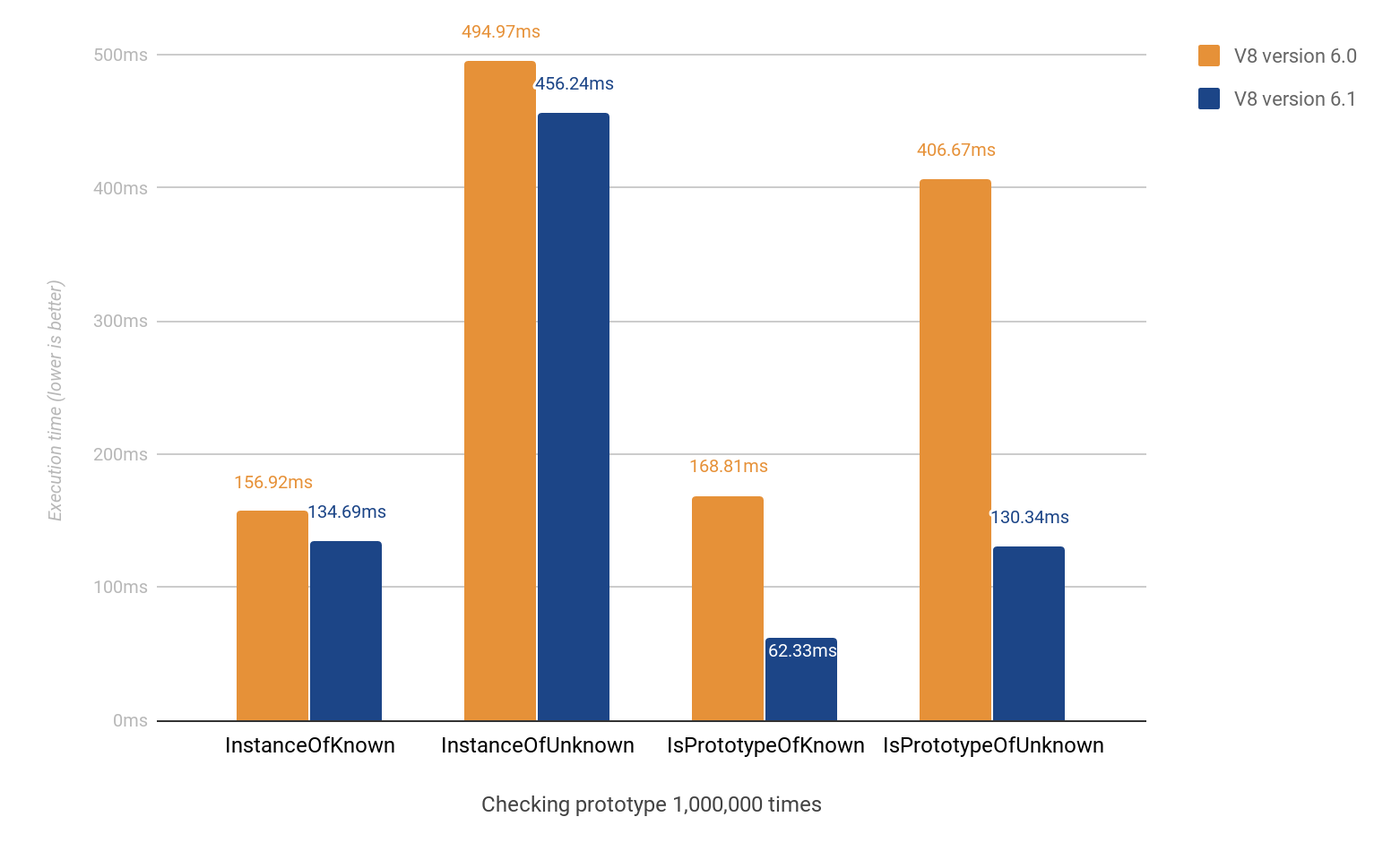
In addition to that, work continued on the performance of other language features. For example, the Object.prototype.isPrototypeOf method, which is important for constructor-less code using mostly object literals and Object.create instead of classes and constructor functions, is now always as fast and often faster than using the instanceof operator.
Function calls and constructor invocations with variable number of arguments also got significantly faster. Calls made with Reflect.apply and Reflect.construct received an up to 17× performance boost in the latest version.


Array.prototype.forEach is now inlined in TurboFan and optimized for all major non-holey elements kinds.

Binary size reduction

The V8 team has completely removed the deprecated Crankshaft compiler, giving a significant reduction in binary size. Alongside the removal of the builtins generator, this reduces the deployed binary size of V8 by over 700 KB, depending on the exact platform.

asm.js is now validated and compiled to WebAssembly

If V8 encounters asm.js code it now tries to validate it. Valid asm.js code is then transpiled to WebAssembly. According to V8’s performance evaluations, this generally boosts throughput performance. Due to the added validation step, isolated regressions in startup performance might happen.

Please note that this feature was switched on by default on the Chromium side only. If you are an embedder and want to leverage the asm.js validator, enable the flag --validate-asm.

WebAssembly

When debugging WebAssembly, it is now possible to display local variables in DevTools when a breakpoint in WebAssembly code is hit.


V8 API
Please check out our summary of API changes. This document is regularly updated a few weeks after each major release.


Developers with an active V8 checkout can use git checkout -b 6.1 -t branch-heads/6.1 to experiment with the new features in V8 v6.1. Alternatively you can subscribe to Chrome’s Beta channel and try the new features out yourself soon.

Posted by the V8 team

Tuesday, July 18, 2017

Upcoming RegExp features

Regular expressions, or RegExps, are an important part of the JavaScript language. When used properly, they can greatly simplify string processing.

ES2015 introduced many new features to the JavaScript language, including significant improvements to the regular expression syntax with the Unicode (/u) and sticky (/y) flags. But development has not stopped since then — in tight collaboration with other members at TC39 (the ECMAScript standards body), the V8 team has proposed and co-designed several new features to make RegExps even more powerful.

These features are currently being proposed for inclusion in the JavaScript specification. Even though the proposals have not been fully accepted, they are already at Stage 3 in the TC39 process. We have implemented these features behind flags (see below) in order to be able to provide timely design and implementation feedback before the specification is finalized.

In this blog post we want to give you a preview of this exciting future. If you'd like to follow along with the upcoming examples, enable experimental JavaScript features at chrome://flags/#enable-javascript-harmony.

Named Captures


Regular expressions can contain so-called captures (or groups), which can capture a portion of the matched text. So far, developers could only refer to these captures by their numeric index, which is determined by the position of the capture within the pattern.
const pattern = /(\d{4})-(\d{2})-(\d{2})/u;
const result = pattern.exec('2017-07-03');
// result[0] === '2017-07-03'
// result[1] === '2017'
// result[2] === '07'
// result[3] === '03'

But regular expressions are already notoriously difficult to read, write, and maintain, and numeric references can add further complications. For instance, in longer patterns it can be tricky to determine the index of a particular capture:
/(?:(.)(.(?<=[^(])(.)))/  // Index of the last capture?

And even worse, changes to a pattern can potentially shift the indices of all existing captures:
/(a)(b)(c)\3\2\1/     // A few simple numbered backreferences.
/(.)(a)(b)(c)\4\3\2/  // All need to be updated.

Named captures are an upcoming feature that helps mitigate these issues by allowing developers to assign names to captures. The syntax is similar to Perl, Java, .Net, and Ruby:
const pattern = /(?<year>\d{4})-(?<month>\d{2})-(?<day>\d{2})/u;
const result = pattern.exec('2017-07-03');
// result.groups.year === '2017'
// result.groups.month === '07'
// result.groups.day === '03'

Named captures can also be referenced by named backreferences and through String.prototype.replace:
// Named backreferences.
/(?<lowercasex>x)y\k<lowercasex>/.test('xyx');  // true

// String replacement.
const pattern = /(?<fst>a)(?<snd>b)/;
'ab'.replace(pattern, '$<snd>$<fst>');  // 'ba'
'ab'.replace(pattern, (m, p1, p2, o, s, {fst, snd}) => fst + snd);  // 'ba'

Full details of this new feature are available in the specification proposal.

dotAll Flag


By default, the . atom in regular expressions matches any character except for line terminators:
/foo.bar/u.test('foo\nbar');  // false

A proposal introduces dotAll mode, enabled through the /s flag. In dotAll mode, . matches line terminators as well.
/foo.bar/su.test('foo\nbar');  // true

Full details of this new feature are available in the specification proposal.

Unicode Property Escapes


Regular expression syntax has always included shorthands for certain character classes. \d represents digits and is really just [0-9]; \w is short for word characters, or [A-Za-z0-9_].

With Unicode awareness introduced in ES2015, there are suddenly many more characters that could be considered numbers, for example the circled digit one: ①; or considered word characters, for example the Chinese character for snow: 雪.

Neither of these can be matched with \d or \w. Changing the meaning of these shorthands would break existing regular expression patterns.

Instead, new character classes are being introduced. Note that they are only available for Unicode-aware RegExps denoted by the /u flag.
/\p{Number}/u.test('①');     // true
/\p{Alphabetic}/u.test('雪');  // true

The inverse can be matched by with \P.
/\P{Number}/u.test('①');     // false
/\P{Alphabetic}/u.test('雪');  // false

The Unicode consortium defines many more ways to classify code points, for example math symbols or Japanese Hiragana characters:
/^\p{Math}+$/u.test('∛∞∉');                            // true
/^\p{Script_Extensions=Hiragana}+$/u.test('ひらがな');  // true

The full list of supported Unicode property classes can be found in the current specification proposal. For more examples, take a look at this informative article.

Lookbehind Assertions


Lookahead assertions have been part of JavaScript’s regular expression syntax from the start. Their counterpart, lookbehind assertions, are finally being introduced. Some of you may remember that this has been part of V8 for quite some time already. We even use lookbehind asserts under the hood to implement the Unicode flag specified in ES2015.

The name already describes its meaning pretty well. It offers a way to restrict a pattern to only match if preceded by the pattern in the lookbehind group. It comes in both matching and non-matching flavors:
/(?<=\$)\d+/.exec('$1 is worth about ¥123');  // ['1']
/(?<!\$)\d+/.exec('$1 is worth about ¥123');  // ['123']

For more details, check out our previous blog post dedicated to lookbehind assertions, and examples in related V8 test cases.

Acknowledgements


This blog post wouldn’t be complete without mentioning some of the people that have worked hard to make this happen: especially language champions Mathias Bynens, Dan Ehrenberg, Claude Pache, Brian Terlson, Thomas Wood, Gorkem Yakin, and Irregexp guru Erik Corry; but also everyone else who has contributed to the language specification and V8’s implementation of these features.

We hope you’re as excited about these new RegExp features as we are!

Posted by Yang Guo and Jakob Gruber, V8 RegExperts

Friday, June 9, 2017

V8 Release 6.0

Every six weeks, we create a new branch of V8 as part of our release process. Each version is branched from V8’s git master immediately before a Chrome Beta milestone. Today we’re pleased to announce our newest branch, V8 version 6.0, which will be in beta until it is released in coordination with Chrome 60 Stable in several weeks. V8 6.0 is filled with all sorts of developer-facing goodies. We’d like to give you a preview of some of the highlights in anticipation of the release.

SharedArrayBuffers

V8 6.0 introduces support for SharedArrayBuffer, a low-level mechanism to share memory between JavaScript workers and synchronize control flow across workers. SharedArrayBuffers give JavaScript access to shared memory, atomics, and futexes. SharedArrayBuffers also unlock the ability to port threaded applications to the web via asm.js or WebAssembly.

For a brief, low-level tutorial, see the spec tutorial page or consult the Emscripten documentation for porting pthreads.

Object rest/spread properties

This release introduces rest properties for object destructuring assignment and spread properties for object literals. Object rest/spread properties are Stage 3 ES.next features.

Spread properties also offer a terse alternative to Object.assign() in many situations.

// Rest properties for object destructuring assignment:
const person = {
  firstName: 'Sebastian',
  lastName: 'Markbåge',
  country: 'USA',
  state: 'CA',
};
const { firstName, lastName, ...rest } = person;
console.log(firstName); // Sebastian
console.log(lastName); // Markbåge
console.log(rest); // { country: 'USA', state: 'CA' }

// Spread properties for object literals:
const personCopy = { firstName, lastName, ...rest };
console.log(personCopy);
// { firstName: 'Sebastian', lastName: 'Markbåge', country: 'USA', state: 'CA' }

For more information, see the usage post on Web Fundamentals.

ES6 Performance

V8 6.0 continues to improve performance of ES2015 features. This release contains optimizations to language feature implementations that overall result in a roughly 10% improvement in V8’s ARES-6 score.

V8 API

Please check out our summary of API changes. This document is regularly updated a few weeks after each major release.

Developers with an active V8 checkout can use 'git checkout -b 6.0 -t branch-heads/6.0' to experiment with the new features in V8 6.0. Alternatively you can subscribe to Chrome's Beta channel and try the new features out yourself soon.

Posted by the V8 team